Timeshifter® Jet Lag
- 4.4
- Rating
- 100.00K
- Installs
- Free
- Price

 Analysis by App-foxy
Long-haul travel is tiring enough without trying to calculate sleep windows, daylight exposure, and local time while moving between time zones. I tested Timeshifter® Jet Lag as a travel and local app from Timeshifter Inc., and its main appeal is that it turns circadian-rhythm advice into a personal travel schedule rather than leaving me to search through general jet-lag tips. The experience is built around planning: I enter the journey details, review the recommended timing, and use the plan as a guide before, during, and after the flight.
That approach makes the app especially interesting for people who want structure but do not want to study sleep science. It is free to install, rated for Everyone, and has reached over 100K installs with a 4.4 average from around 1.9K ratings. In-app items range from $4.99 to $24.99, so the initial download is easy to try, but the complete value depends on which plan or travel option I need.
How the planning experience feels to use
I find the planning experience most useful when I treat it as preparation rather than something to decipher mid-flight. Before traveling, I can note which recommendations may clash with meals, work, or family responsibilities and decide what is realistic. That small check helps turn a personalized schedule into a flexible aid, which matters most when the journey itself refuses to go to plan.
You May Also Like

 Blood Strike: 2.5 Anniversary
Blood Strike’s Loadouts Turn Every Drop Into a Tactical Gamble
A close look at Blood Strike’s custom loadouts: how fast access to signature weapons reshapes its battle royale rhythm, rewards preparation, and narrows the gap between fights.

 Pandora - Music & Podcasts
Pandora’s Music Is Easy to Start, but Harder to Recover
Pandora’s strength is its low-effort path from a seed to a station. Its weak spot is how much confidence it asks you to place in connection, setup, and quiet recovery.

 8 Ball Pool
8 Ball Pool Is Built on Rivalries, Rematches, and Routine
A close look at the rivalries, rematches, shared routines, and unanswered safety questions that turn a quick pool match into a persistent mobile community.

 Samsung Music
Samsung Music’s Quiet Strength Is Playing What You Already Own
Its reach comes less from spectacle than from dependable access to a personal library. That simplicity is both the app’s strongest retention engine and its ceiling.

 AccuWeather: Weather Radar
AccuWeather Review: A Quick, Clear Forecast for Everyday Decisions
For everyday plans, the best forecast is the one you can understand quickly. AccuWeather makes rain timing, radar, and local conditions easy to act on, with a few trade-offs.

 Hill Climb Racing
Why Hill Climb Racing Still Turns Crashes Into One More Run
A tiny car, a bumpy hill and one more upgrade: Hill Climb Racing keeps resurfacing because its simple chaos makes every near-miss feel personal.
More From Our News Desk



Readability and navigation that keep the task focused
The strongest design choice is the app’s narrow purpose. Instead of presenting a large travel dashboard filled with airport information, hotel tools, currency conversion, and destination content, it concentrates on the sleep-and-light decisions that matter for jet lag. That focus reduces the amount of navigation I need to do. I am not hunting through unrelated menus to find the next recommendation.
The schedule is easier to understand when I treat it as a sequence of actions rather than as a medical explanation. The useful question is not “What is circadian science?” but “What should I do before boarding, during the flight, and after landing?” Timeshifter is at its best when I open it with that practical mindset. The plan gives me a framework for the trip instead of expecting me to remember a long article.
For readers who prefer large, plain visual information, the app’s concept is more approachable than a spreadsheet or a manually built calendar. A recommendation tied to a travel day is less mentally demanding than comparing departure time, arrival time, home time, destination time, and ideal sleep timing on my own. That matters when I am already tired or distracted by airport logistics.
There is still a difference between simple content and universally accessible content. A compact schedule can be clear to one person and feel dense to another, particularly if the user is dealing with low vision, reading fatigue, attention difficulties, or unfamiliar travel terminology. I would take time before the trip to inspect the full plan, enlarge the device text if needed, and save the key instructions in a form I can revisit without rushing.
The app is not a replacement for a human travel companion who can explain a recommendation in different words. If I need every step spoken aloud, translated, or adapted to a very specific communication preference, I would not assume the app alone will cover that need. Its focused presentation helps, but personal preparation remains important.
Why personalization is more useful than generic jet-lag advice
Most ordinary alternatives give broad suggestions: sleep on the plane, seek daylight, avoid certain habits, and adjust gradually. Those ideas may be sensible, but they do not tell me how to apply them to my exact route. Timeshifter’s advantage is the attempt to connect the advice with my itinerary and sleeping pattern.
That distinction becomes meaningful on a trip with an awkward departure. Imagine leaving after work, taking an overnight flight, changing the clock substantially, and needing to attend a morning meeting soon after arrival. A generic article cannot easily tell me which part of the journey should be treated as nighttime. A personalized plan gives me a reference point for deciding when to rest and when to stay awake, even if real life forces compromises.
One non-obvious benefit is that the plan can reduce decision fatigue before the journey. I can review it while still at home, identify the difficult parts, and decide what I need to pack for them. That might mean an eye mask, headphones, a familiar sleep aid that I already use safely, or a way to protect a quiet period. The app does not solve the practical problem by itself, but it reveals where the problem is likely to occur.
I also find the schedule more useful when I regard it as a target rather than a command. Flights are delayed, cabin lights are unpredictable, children may need attention, and business travel rarely follows an ideal sleep pattern. Treating every recommendation as mandatory could create stress. The better workflow is to follow the high-priority parts when possible and use the rest as guidance.
Motor and sensory considerations during travel
Travel is an unusually demanding environment for any app. I may be standing in a security line, holding a passport, carrying a bag, or using a phone with one hand. A jet-lag planner should therefore be something I can consult quickly, not a tool that requires constant interaction. Timeshifter’s focused purpose helps because I do not need to perform complicated travel searches while moving through an airport.
However, a schedule involving sleep and light is inherently sensory. Recommendations about seeking light or avoiding light may be difficult for someone with light sensitivity, migraine triggers, sensory processing differences, or a condition that makes sleep disruption especially problematic. The app can organize timing, but it cannot know every personal response to brightness, noise, crowded terminals, or an unfamiliar hotel room.
For a user with limited dexterity, the most practical strategy is to prepare before departure. I would review the schedule at home, note the important transition points, and keep the phone accessible. This reduces the need for repeated tapping when the device is difficult to operate in a moving vehicle or a crowded terminal. I would also avoid assuming that a tired traveler can comfortably manage a long sequence of instructions in the moment.
For someone with hearing-related needs, the core value is not dependent on a conversation with another person; the plan is something I can read. That may be useful, but it should not be confused with full support for every communication style. I would want the important recommendations to remain understandable without relying on audio prompts, and I would check the interface personally before depending on it for a high-stakes itinerary.
People with cognitive disabilities may appreciate the predictable structure, especially if a long trip feels overwhelming. At the same time, changing time zones can make working memory and concentration worse. I would simplify the plan into a few personal reminders rather than trying to memorize every detail. A companion could also help by turning the recommendations into a shared routine, such as “rest during this flight segment” or “look for daylight after arrival,” without treating the schedule as a rigid test.
Situational access: where the app helps and where the trip gets in the way
The app is most useful when I have enough control over my schedule to make reasonable adjustments. Leisure travelers with a planned itinerary, frequent flyers who want a repeatable routine, and professionals arriving for an important event are the clearest matches. It can also help a traveler who understands that jet lag is not just tiredness but a mismatch between the body clock and the destination day.
The situation changes when I am traveling with young children, supporting another passenger, working irregular shifts, or dealing with a medical condition that affects sleep. In those circumstances, the plan may still offer helpful context, but following it precisely may be unrealistic. I would use it to understand the intended direction of adjustment, then adapt it around caregiving, medication schedules, meals, and safety.
Another practical use is preparing for the return journey. Many people plan carefully for the outbound flight and then improvise the trip home. A circadian plan can make me think about both directions in advance, which is valuable when the return departure is at an inconvenient hour or when I have to resume normal work immediately.
There is also a useful distinction between access to information and access to the conditions needed to follow it. The app may tell me that a certain light environment or sleep period would be helpful, but I cannot control a bright aircraft cabin, a noisy seatmate, a shared hotel room, or a delayed connection. This is not a flaw unique to Timeshifter; it is a reminder that digital guidance operates inside a physical journey.
Compared with a printed sleep chart, the app is more personal and easier to revise around a specific itinerary. Compared with a general wellness app, it is more directly tied to crossing time zones. Compared with asking a search engine for advice, it saves me from combining several sources and translating them into a schedule. The trade-off is that a generic guide is free to consult repeatedly and may be more flexible for unusual circumstances, while a personalized travel plan may involve an in-app purchase.
What I would check before relying on a plan
My first check would be whether the trip is actually suitable for a structured jet-lag strategy. A short journey across a small time difference may not justify much preparation, particularly if I can keep my normal routine. The app becomes more compelling when the time-zone change is large, the trip is short, or the first day at the destination matters.
My second check would be my ability to follow the recommendations safely. I would not sacrifice alertness while driving, operating equipment, supervising a child, or navigating an unfamiliar city just to obey a sleep suggestion. If the plan conflicts with safety, safety wins. That sounds obvious, but fatigue can make people treat a schedule as more authoritative than it is.
I would also separate circadian guidance from medical advice. Someone managing insomnia, bipolar disorder, epilepsy, migraine, pregnancy, or medication timing should discuss significant sleep and light changes with an appropriate healthcare professional. The app’s purpose is travel planning, not diagnosis or individualized treatment. That boundary is important because a polished schedule can feel more medically definitive than a general travel tool actually is.
Another limitation is motivation. The recommendations may be sensible, but they require cooperation from me. I have to protect sleep, manage light exposure, and accept that a comfortable travel routine may be less convenient than staying awake for entertainment or work. If I know I will ignore any plan that interferes with my usual habits, Timeshifter may not deliver much benefit.
The purchase model is another point to consider. The app itself is free, while individual in-app items cost between $4.99 and $24.99. I would examine what applies to my specific journey before paying, rather than assuming that downloading the app includes every planning option. That is a small but important step for anyone comparing it with free articles, a paper schedule, or advice from a travel clinic.
Small workflow changes that make the guidance more usable
I would not wait until boarding to open the app for the first time. The best workflow is to enter the trip while I still have reliable internet, review the complete schedule, and identify the two or three moments that will be hardest to follow. This turns the plan into preparation rather than an emergency reference.
I would then combine the recommendations with the realities of my seat and destination. If I am likely to sleep, I would arrange the things that make sleep possible before the flight begins. If light timing matters after arrival, I would think about where I will be, how I will get there, and whether I can safely follow the suggestion while carrying luggage. This is a concrete advantage of using the app early: it exposes logistical problems before they become exhausting.
A second useful tactic is to tell a travel companion what the plan is trying to achieve without asking them to follow it exactly. For example, they may understand that I need a quiet period or that I am trying not to nap at a particular point. Shared expectations can be more effective than repeatedly checking a phone in a crowded cabin.
A third is to use the plan as a post-arrival checklist for the first day, not only as a flight schedule. Jet lag often becomes obvious after the excitement of landing fades. I would keep the relevant guidance available when deciding whether to take a nap, seek daylight, or push through until a more suitable local bedtime. This is where the app can be more useful than advice read once before departure.
For users with reading or attention challenges, I would rewrite the plan into short personal phrases in a notes app or on paper, while keeping the original schedule available for reference. That is not a special feature I would attribute to Timeshifter; it is a practical adaptation that makes any detailed plan easier to follow. It also reduces the need to navigate while fatigued.
Who should use it and who should choose another approach
I would recommend trying it to a frequent flyer who wants a repeatable method instead of vague advice. It is also a good candidate for a traveler with an important first day, such as a conference, examination, performance, or family event, because reducing uncertainty can be nearly as valuable as reducing tiredness.
It suits people who are comfortable using a phone as a planning aid and who can make at least some changes to sleep and light exposure. The personalized format is the main reason to choose it over a normal search result. The developer, Timeshifter Inc., has kept the product centered on this particular travel problem rather than turning it into a broad collection of unrelated tools.
I would be more cautious about recommending it to someone taking a very short trip, someone whose schedule is controlled entirely by shift work or caregiving, or someone who needs clinical sleep support. In those cases, a healthcare professional, an occupational plan, or a simple flexible routine may be a better fit. A person who dislikes paid in-app planning may also prefer free general guidance, accepting that it will require more personal interpretation.
The age rating of Everyone makes the app broadly approachable, but that does not mean every recommendation is equally suitable for every traveler. Children, older adults, and people with health-related sleep concerns may need an adult or professional to help interpret the plan. The rating describes general content suitability, not a guarantee that the strategy fits every body or travel situation.
My inclusive verdict after looking beyond the itinerary
Timeshifter® Jet Lag is a focused planning tool with a meaningful advantage over generic travel advice: it tries to translate body-clock principles into a schedule connected to my journey. I appreciate that it can reduce mental arithmetic and give a tired traveler something concrete to follow. The free entry point makes it reasonable to inspect the experience before deciding whether an in-app purchase is worthwhile, and the current version is 2.6.1.
Its inclusive value comes mainly from clarity of purpose. A person who finds long explanations confusing may benefit from a travel-specific sequence, while someone with sensory, motor, cognitive, or communication needs can prepare adaptations around that sequence. Still, I would not describe it as universally accessible based on the concept alone. The physical environment, personal health, device settings, and ability to control sleep conditions all affect whether the recommendations are practical.
My honest recommendation is to use it as a flexible travel coach, not as a strict rulebook. Review the plan early, convert its most important points into simple reminders, involve a companion when useful, and give safety and medical advice priority over any schedule. If you want personalized structure for a major time-zone change, this app is worth considering. If your trip is short, unpredictable, or medically complicated, a simpler routine or professional guidance may serve you better.
FAQs for Timeshifter® Jet Lag
01What is Timeshifter® Jet Lag and how does it work?
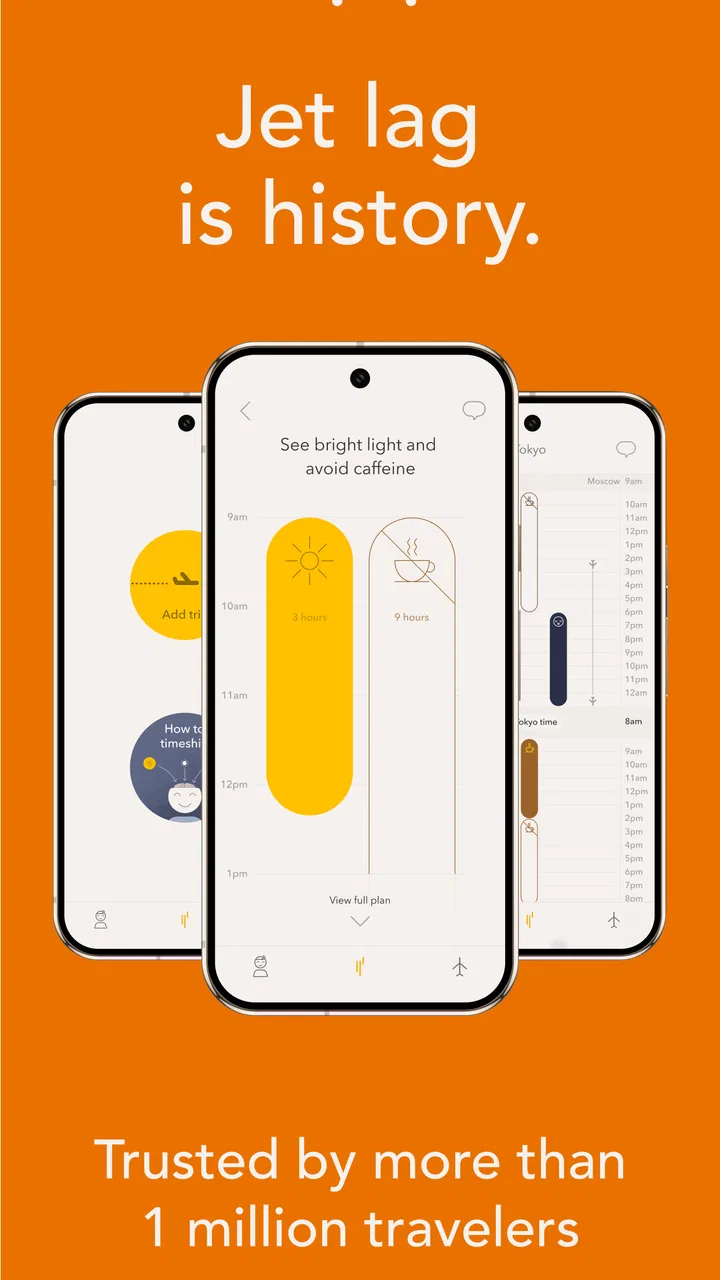
Timeshifter® Jet Lag is a travel-planning app designed to help reduce the effects of jet lag after crossing time zones. It creates a personalized schedule based on your flight details, destination, normal sleep pattern, and preferences. The plan can recommend when to seek or avoid bright light, sleep, nap, and use caffeine, helping you gradually adjust your body clock.
02Do I need to enter my flight and sleep information before using the app?
Yes. To generate a useful jet-lag plan, Timeshifter® typically requires information such as your departure and arrival locations, flight times, usual sleep schedule, and personal preferences. The more accurate these details are, the more practical the recommendations will be. It is best to create the plan before traveling so you have time to review the schedule and prepare.
03Does Timeshifter® Jet Lag require a subscription or payment?
Timeshifter® Jet Lag is not generally a completely free service. Access may depend on the specific plan, trip, or package offered in the app, and pricing can vary by platform or promotion. Before confirming a purchase, check the current App Store or Google Play listing and the in-app payment screen for details about included trips, subscriptions, renewal terms, and refund policies.
04Can Timeshifter® Jet Lag guarantee that I will not experience jet lag?
No app can guarantee that jet lag will be completely avoided. Timeshifter® provides evidence-based scheduling guidance intended to support adjustment to a new time zone, but results differ between travelers. Age, health, sleep quality, stress, flight conditions, alcohol consumption, and how closely you follow the recommendations can all affect the outcome. Consider it a planning aid, not a medical cure.
05Is Timeshifter® Jet Lag suitable for everyone, including people with medical conditions?
The app may be helpful for many adult travelers, but its recommendations are not a substitute for advice from a doctor. People who are pregnant, taking medication, managing sleep disorders, or dealing with other medical conditions should be especially careful with guidance involving light exposure, caffeine, or melatonin. Review the app’s safety information and consult a qualified healthcare professional when unsure before following a plan.
Pros
- Personalized plans adapt to your flight schedule and time zones.
- Clear light-exposure guidance is easy to follow while traveling.
- Supports both eastward and westward trips.
- Plans can be prepared before departure for better organization.
- Useful for frequent flyers and travelers with demanding itineraries.
Cons
- Full access requires a paid plan or individual trip purchase.
- Recommendations may be difficult to follow during busy travel days.
- You must enter accurate flight details for useful scheduling.
- The app cannot eliminate jet lag or guarantee immediate results.
- Light advice may be impractical for travelers with medical restrictions.

Timeshifter® Jet Lag
Gallery